
Scoot has one of the strictest check-in policies among low-cost airlines. Even arriving one minute late may result in denied boarding with no refund.
If you're unsure when check-in closes or how early you should arrive at the airport, you could miss your flight and face unexpected additional costs.
This guide covers everything you need to know about Scoot check-in, including check-in methods (mobile app, self-service kiosks, and airport counters), check-in deadlines, airport procedures, and practical solutions to common check-in problems.
Whether you're flying with Scoot for the first time or you're a frequent traveler, this guide will help you check in smoothly and board with confidence.
Like most low-cost carriers (LCCs), Scoot uses dynamic pricing, so fares often increase as the departure date approaches. Once you've decided on your travel dates, it's best to compare fares early before prices rise.
✈️ Compare Today's Lowest Scoot Fares
Scoot uses dynamic pricing, meaning fares can increase quickly as seats sell out. Even the same flight may cost significantly more just a few hours later.
👉 Booking earlier could help you secure a lower fare.
*Compare fares from multiple airlines, including taxes and fees.
Three Scoot Check-in Options Explained: Methods, Deadlines, and Step-by-Step Guide
Scoot offers three convenient ways to check in before your flight.
←
Scroll horizontally
| Check-in Method | Features & Benefits |
|---|---|
| 📱 Mobile App / Online Check-in | Complete check-in before arriving at the airport. If you have checked baggage, simply proceed to the designated Bag Drop counter, making your airport experience faster and more convenient. |
| 🤖 Self-Service Check-in Kiosk | Print your boarding pass in seconds using your booking reference or QR code. Currently available at Narita Airport. |
| 💁 Airport Check-in Counter | Receive personal assistance from Scoot staff. This option is recommended if your itinerary requires document or visa verification, you need special assistance, or you encounter unexpected travel issues. |
Here is a summary of the differences between Scoot’s three check-in options and the key points you should know before your flight.
Scoot App (Online Check-in)
- Available from 48 hours before departure until 90 minutes before departure
- Your boarding pass is issued digitally and can be displayed on your smartphone
If you have checked baggage, you must proceed to the airport Bag Drop counter or designated baggage drop lane after completing online check-in.
Self-Service Check-in Kiosk | A Fast and Convenient Airport Option
Self-service kiosks allow passengers to complete check-in quickly at the airport without waiting for assistance from airport staff.
In Japan, these kiosks are currently available only at Narita Airport.
- Check in using your booking reference or QR code
- Easy to use, even for first-time Scoot passengers
A good choice for travelers who prefer a quick self-service option at the airport.
Airport Check-in Counter | Best for Personal Assistance
If you prefer support from airport staff, the check-in counter is the most suitable option.
- Available at airports where Scoot operates flights
- Staff can assist with document checks, special requests, and unexpected travel issues
Recommended for passengers who need extra assistance or have special travel requirements.
Which Check-in Option Should You Choose?
- Want the fastest and easiest airport experience? → Online Check-in
- Prefer a simple self-service option at the airport? → Self-Service Check-in Kiosk
- Need assistance or have special circumstances? → Airport Check-in Counter
💡 Personal Experience: An Unexpected Seat Upgrade at the Scoot Check-in Counter

Here is a personal experience I had while flying with Scoot.
At the check-in counter, I decided to make a polite request, although I wasn't expecting much:
"If there are any seats available, would it be possible to move me to an aisle seat?"
The staff member smiled and replied:
"Unfortunately, all aisle seats are already taken. However, if you don't mind a middle seat, I can move you to a front-row Stretch Seat with extra legroom at no additional cost."
It was an unexpected upgrade to a spacious seat near the front of the aircraft, which normally requires an additional fee of several thousand yen.
Of course, as a low-cost carrier, Scoot cannot guarantee seat changes or complimentary upgrades. However, making a polite request can sometimes lead to a pleasant surprise like this, which is one of the enjoyable experiences of flying with Scoot.
※The author has flown with LCCs more than 15 times.
How to Check In Online with the Scoot App | Times, Steps, and Important Tips
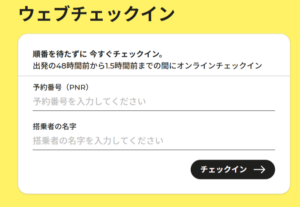
Scoot's online check-in through the Scoot app allows passengers to complete the check-in process before arriving at the airport.
By checking in in advance, you can proceed directly to the designated Bag Drop counter on the day of departure if you have checked baggage, helping you save valuable time at the airport.
This section explains the online check-in period, step-by-step instructions, and important points to know before your flight.
Online Check-in Period | From 48 Hours Before Departure Until 90 Minutes Before Departure
Scoot's online check-in availability is as follows:
- Opens: 48 hours before the scheduled departure time
- Closes: 90 minutes before the scheduled departure time
How to Check In Online (Scoot App Steps)
- Download the Scoot app
- Retrieve your booking using your booking reference
- Select "Check In" from the app menu
- Display your digital boarding pass (QR code)
Common Online Check-in Problems and Solutions
- Your booking does not appear in the app:
Use the "Add Booking" function and enter your booking reference to link your reservation. - Unable to complete check-in:
Check that you are within the available check-in period and confirm that your booking does not have any restrictions. - Unable to display the QR code:
Try again in an area with a stable internet connection. Saving a screenshot of your boarding pass in advance is also recommended.
What to Do After Online Check-in | Airport Process
- With checked baggage:
Proceed to the designated Bag Drop counter and complete baggage drop-off at least 60 minutes before departure.
Should You Use Online Check-in?
If available, online check-in is highly recommended.
It reduces waiting time at the airport and helps create a smoother boarding experience, making it a convenient option for many Scoot passengers.
How to Check In at the Scoot Airport Counter|Opening Hours, Eligible Passengers, and Important Points
This section explains how to check in at the Scoot airport counter, including who should use the counter, what documents are required, and important points to avoid problems before departure.
Although online check-in is recommended, some passengers may need to complete procedures at the airport counter depending on their route, travel documents, or special circumstances.
【Real Experience from the Editor】A Simple Name Mistake That Could Cost Over $700

When checking in for an international flight, there is one mistake travelers should never overlook:
entering passenger names incorrectly during booking.
Your ticket name must match your passport details exactly.
Even a small mistake in the order of your first and last name may cause problems during check-in.
- Surname / Last Name = Family name
- Given Name / First Name = First name
Why Name Errors Can Cause Check-in Problems
International airlines verify passenger information against passport details.
If the name does not match, airport staff may need to confirm the booking manually.
In some cases, corrections may be possible, but policies differ depending on the airline and ticket conditions.
Contacting the airline as soon as you notice an error is strongly recommended.
My Experience: Correcting a Name Mistake Before Departure
In my case, I noticed that my name order was entered incorrectly after booking an international flight.
I contacted the airline before departure and was fortunately able to correct the mistake without additional charges.
However, some travelers discover these issues only at the airport, which can result in complicated procedures or additional costs.
⚠️ Important Notes
- Policies vary depending on the airline and airport
- Contact the airline immediately after noticing any mistake
- Always check your booking confirmation against your passport
Lesson Learned: Always Check Your Passenger Information After Booking
- Surname / Last Name = Family name
- Given Name / First Name = First name
Checking your reservation details early can prevent unexpected problems at the airport.
Scoot's airport counter check-in allows passengers to complete the check-in process with assistance from airport staff.
It is the most reliable option for passengers who are unable to use the app or self-service check-in kiosks, or for those who prefer personal assistance.
Who Needs to Use the Airport Counter?
You will need to check in at the airport counter if any of the following apply:
- You cannot use the Scoot app or self-service check-in kiosk
- You require special assistance, such as wheelchair support
- You have special baggage requirements (oversized items, restricted items, etc.)
Airport Counter Check-in Process
- Go to the Scoot check-in counter
- Provide your booking reference
- Complete identity verification and document checks (passport required for international flights)
- Receive your boarding pass
- Check in your baggage if required
After completing check-in, proceed to the security checkpoint.
Important Tips | Allow Extra Time for Crowds
- During peak travel periods (Golden Week, summer holidays, and long weekends), long waiting times may occur
- International flights require additional time for document verification
- Check-in closes 60 minutes before departure
Considering possible queues at the counter, arriving at the airport at least 90–120 minutes before departure is recommended.
For early morning flights and holiday periods, arriving even earlier is strongly recommended.
Common Mistakes and How to Avoid Them
Unable to Check In Due to Long Queues
Airport counters can become very crowded, especially for morning departures and during busy travel periods.
Allow enough time for the check-in process and join the line as early as possible.
Missing Required Documents (International Flights)
For international flights, check-in may not be completed if you are missing required documents such as your passport or visa.
Always check passport validity and entry requirements before departure.
Scoot Check-in Deadline Guide | Final Check-in Times and How to Avoid Missing Your Flight
Scoot is a low-cost carrier (LCC), which means its check-in and boarding deadlines are strictly enforced.
Missing the deadline by even one minute may result in being unable to board, so it is essential to understand the exact check-in times before traveling.
This section explains Scoot's check-in deadlines and important tips to help you avoid problems at the airport.
What Happens If You Miss the Deadline?
- After check-in closes → You may be denied boarding, and no refund may be provided
- Late arrival due to personal reasons → Rebooking or alternative flight arrangements may not be available
LCC policies are strict, and exceptions are extremely rare.
How Early Should You Arrive at the Airport?
When flying with Scoot, arriving with extra time is essential rather than arriving at the last minute.
Avoid rushing to the airport and allow enough time for check-in, baggage drop-off, security screening, and walking to the boarding gate.
Recommended Hotels for Early Morning Flights
Scoot operates several early morning departures from major airports in Japan.
Staying at an airport hotel the night before can reduce travel stress and help ensure you arrive at the airport on time.
This is especially recommended if you're traveling from outside the airport area or have a long journey to the airport.
Below are two highly rated hotels offering convenient airport access.

Ideal for Early Morning Flights from Narita Airport
Toyoko Inn Narita Airport Main Building
The hotel offers a free airport shuttle starting at 4:20 a.m., making it an excellent choice for AirAsia and other early morning LCC departures. Taking the first shuttle allows you to arrive at Narita Airport at approximately 4:50 a.m.

Ideal for Early Morning Flights from Kansai Airport
Kansai Airport Washington Hotel
A complimentary shuttle bus operates between the hotel and Kansai International Airport, making this hotel a convenient option for travelers catching early morning flights without worrying about transportation to the airport.
Scoot Airport Process Guide | Step-by-Step from Check-in to Boarding and Tips for a Smooth Journey

When flying with Scoot, it is important to understand the airport process in advance.
Since LCCs have strict deadlines, not knowing the procedure can increase the risk of missing your flight.
Airline Express Editor's Note: Narita Airport Boarding Gates Can Be Farther Than Expected

When departing from Narita Airport (NRT) with Scoot, one important thing to keep in mind is the distance to the boarding gate.
Scoot flights often use the 90-series gates at Terminal 2, which are located in the Satellite area past the security checkpoint.
Even at a normal walking pace, it can take around 10–15 minutes to reach the gates, which may take longer than many passengers expect.
Although moving walkways are available, many travelers are surprised by how far the gates are from the main terminal area.
⚠️ Important Tip to Avoid Missing Your Flight
Many passengers spend too much time shopping at duty-free stores and suddenly realize that boarding time is approaching.
The Satellite area has fewer shops and cafes compared with the main terminal building, so it is recommended to finish shopping and buying necessities before leaving the main terminal, then head to the gate early.
※The Satellite area at Narita Airport Terminal 2 is a place where LCC passengers often get confused, so allow extra time when traveling through this area.
Check-in (Before Arriving at the Airport or at the Counter)
First, complete your check-in process.
You cannot board the aircraft unless check-in has been completed.
- Scoot app (Online check-in)
- Self-service check-in kiosk
- Airport check-in counter
Completing online check-in in advance can significantly reduce waiting time at the airport and make your departure process smoother.
Checked Baggage Drop-off (If Required)
If you have checked baggage, proceed to the baggage drop counter to complete the required procedures.
👉 Please note that baggage cannot be accepted after the check-in or baggage drop deadline.
Pass Through Security Screening
All passengers must go through security screening, regardless of whether they have checked baggage.
Security checkpoints can become crowded depending on the time of day, so allow plenty of extra time before your flight.
Proceed to the Boarding Gate
After passing through security, head to your boarding gate.
As mentioned earlier, some gates may be located far from the main terminal area, so make sure to allow enough time for walking.
Boarding
When boarding begins, passengers will be called according to the boarding process.
Please present your boarding pass when entering the aircraft.
Tips for a Smooth Scoot Airport Experience
- Decide your preferred check-in method in advance (app, kiosk, or airport counter)
- Check baggage weight limits before departure and organize your luggage beforehand
- Arrive early, especially during weekends, holidays, and peak travel periods
Common Scoot Check-in Problems and Solutions|Why Check-in Fails & What to Do If You Miss the Deadline

Low-cost carriers (LCCs) such as Scoot have strict check-in rules, and even a small issue can result in passengers being unable to board their flight.
Knowing the most common check-in problems and how to solve them in advance is essential for a smooth journey.
Here are the most common Scoot check-in issues and practical solutions.
Unable to Complete Online Check-in
- Possible causes: Outside the available check-in period, certain international flight restrictions, bookings made through travel agencies, payment issues, or other booking-related problems.
- Solution: Confirm that you are within the online check-in window. If online check-in is unavailable, use the self-service check-in kiosk or airport counter instead.
Booking Does Not Appear in the App
- Possible causes: Your booking has not been linked to your account, or the reservation was made without signing in.
- Solution: Add your booking manually using the "Add Booking" function. For future bookings, sign in before making a reservation to avoid similar issues.
Unable to Display the QR Code (Boarding Pass)
- Possible causes: Poor internet connection, an outdated app version, or temporary system issues.
- Solution: Try opening the boarding pass again in an area with a stable connection. Saving a screenshot of your boarding pass in advance is also recommended.
Travel Itinerary Email Has Not Arrived
- Possible causes: The email was filtered into your spam folder, or an incorrect email address was registered.
- Solution: Check your spam folder first. If you still cannot find the email, contact Scoot customer support and confirm your booking details.
Unable to Arrive Before the Check-in Deadline
- General policy: Missing the deadline due to personal reasons usually results in denied boarding with no refund. Delays from other airlines are generally not covered. In some cases, delays involving public transportation may be considered if official proof is provided.
- Solution: Arrive at the airport early and obtain an official delay certificate if your situation qualifies.
Unable to Make a Connecting Flight
- Cause: Scoot does not always provide through check-in services, and passengers may need to collect and re-check baggage during transfers.
- Solution: Allow at least 90 minutes or more for connections and avoid booking tight transfer schedules.
Summary|Most Check-in Problems Can Be Avoided with Preparation
Most Scoot check-in problems can be prevented through proper planning, early arrival, and advance preparation.
Check your booking details, prepare all required documents, and allow enough time at the airport to enjoy a smooth and stress-free Scoot journey.
Recommended Hotels for Scoot Sale Travelers (Tokyo & Kyoto)
If you're planning a trip to Japan with a Scoot sale fare, it's a good idea to book your hotel as soon as you secure your flight.
During peak travel seasons such as cherry blossom season, autumn foliage, Golden Week, and the New Year holidays, hotel rates can rise quickly. Booking early gives you more choices and better prices.
Below are two highly recommended hotels in Tokyo and Kyoto that offer convenient locations and excellent access for travelers visiting Japan.

Just a 1-Minute Walk from JR Ikebukuro Station
Hotel Metropolitan
Just a one-minute walk from JR Ikebukuro Station, Hotel Metropolitan Ikebukuro offers easy access to major attractions across Tokyo as well as convenient transportation to Narita Airport. It's an excellent base for shopping, sightseeing, and first-time visitors to Japan.

Just a 2-Minute Walk from Kyoto Station – Perfect Base for Exploring Kyoto
Hotel Vischio Kyoto by GRANVIA
Just a two-minute walk from Kyoto Station, Hotel Vischio Kyoto by GRANVIA offers excellent access to Kyoto's most popular attractions. Operated by JR West Hotels, it combines modern comfort, reliable service, and a convenient location, making it an ideal base for exploring Kyoto.

Top Picks in Tokyo, Osaka, Kyoto, Hokkaido & Okinawa
25 Best Hotels in Japan
We’ve selected 25 recommended hotels across Tokyo, Osaka, Kyoto, Hokkaido, and Okinawa. Each hotel was chosen based on accessibility, sightseeing convenience, and how well it suits different travel styles.
💳 My Overseas ATM Experience: When My Card Was Declined Abroad

After arriving at Don Mueang International Airport in Thailand, I had an unexpected problem: my credit cards were repeatedly declined at ATMs, and I was unable to withdraw cash.
This situation can be especially stressful when traveling with LCCs (low-cost carriers), as many budget airlines operate late-night flights. Arriving at your destination without access to cash can quickly become a major issue.
Eventually, Revolut was the only card that worked immediately. My experience showed that overseas ATM availability can vary significantly depending on the card provider and payment network.
▶ Read my real experience of a card being declined at an overseas ATM
Stay Connected in Japan with a Reliable eSIM
Once you've learned how to check in and board your flight, don't forget to prepare your internet connection before traveling to Japan.
A travel eSIM lets you get online as soon as you arrive—no SIM card swaps or pocket Wi-Fi rental required. With mobile data ready on your smartphone, you can easily use Google Maps, book train tickets, contact your hotel, and stay in touch with family and friends throughout your trip.
Set up your eSIM before departure so you can start exploring Japan the moment you land.
🥇 Holafly
Most Popular ★★★★★
[Unlimited Data] Get 5% OFF Your Holafly Unlimited Japan eSIM
🥈 Ubigi
Best Value
[Prepaid Plans] Book Your Ubigi eSIM Plan at a Discounted Rate
🥉 Airalo
Short-Term Trips
📱 Mobal Voice + Data eSIM
Japanese Phone Number
[Japanese Phone Number] Get a Mobal Voice + Data eSIM
\ Never Miss Flight Sales and the Latest Cheap Fare Deals! /
The latest flight sale updates from JAL, ANA, and LCC airlines are also shared daily in real time on our social media channels.
※Receive the latest travel updates, including limited-time flight deals and upcoming sale predictions.
Scoot Check-in Summary | The #1 Rule: Arrive Early to Avoid Missing Your Flight

The single most important thing to remember when flying with Scoot is to arrive early.
As a low-cost carrier (LCC), Scoot strictly enforces its check-in and boarding deadlines. Even a slight delay can result in denied boarding, with no option to rebook in many cases.
Choose from Three Check-in Methods
- Official App (Online Check-in)
- Self-Service Check-in Kiosk
- Airport Check-in Counter
Bottom Line | When in Doubt, Arrive Early
- Complete your check-in before arriving at the airport whenever possible. The official Scoot app is the fastest and most convenient option.
- Planning ahead and arriving early will greatly reduce your chances of missing your flight.
Check Today's Lowest Fares & Latest Deals
