
With Peach Aviation, if you're even one minute late, you won't be allowed to board—and your ticket is generally non-refundable.
If you don't know the answers to questions like "When is the check-in deadline?" or "How early should I arrive at the airport?", you could end up missing your flight or paying unexpected additional fees.
One airport where you need to be especially careful is Kansai International Airport (KIX).
Peach operates from Terminal 2, which is separate from the train station. After arriving at the station, you'll need an additional 20 minutes to reach the check-in kiosks.
Be sure to factor this extra travel time into your schedule.
In this guide, we'll explain everything you need to know about Peach check-in, including how to check in using the mobile app, self-service kiosks, or airport counters, check-in deadlines for domestic and international flights, the airport departure process, and how to solve common check-in issues.
Whether it's your first time flying with Peach or you're simply looking for a refresher, this guide will help you board your flight with confidence.
With low-cost carriers (LCCs), check-in deadlines are strict, and fares can increase quickly as seats sell out. Once you've decided on your travel dates, it's a good idea to check the latest ticket prices before they rise.
Peach Check-in Guide: How to Check In, Deadlines, and 3 Check-in Methods
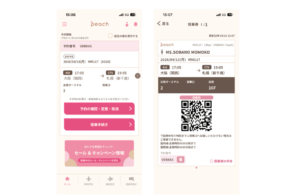
The best check-in method depends on your departure airport and whether you're flying domestically or internationally. Peach offers three convenient ways to check in for your flight.
← Scroll horizontally to view the table
| Check-in Method | Features & Benefits |
|---|---|
| 📱 Official App | Available for eligible domestic flights only. Check in before arriving at the airport and head straight to the security checkpoint. Online check-in is available for eligible domestic flights. |
| 🤖 Self-Service Check-in Kiosk | Check in at an airport kiosk using your booking reference or QR code. Print your boarding pass in less than a minute without staff assistance. |
| 💁 Airport Check-in Counter | Get help from airport staff. This option is recommended for international flights that require document or visa verification, as well as for passengers with special requests or itinerary changes. |
Choosing the right check-in method depends on your itinerary and travel needs. Here's a quick comparison of the three Peach check-in options to help you decide which one is best for your trip.
Peach Official App (Online Check-in) | Best for Domestic Flights
Online check-in allows you to complete the check-in process on your smartphone before arriving at the airport and is available for eligible domestic flights only.
- Available from 120 minutes to 35 minutes before departure
- Your boarding pass is issued as a QR code on your smartphone
- If you have no checked baggage, you can proceed directly to the security checkpoint
Perfect for travelers who want to save time and skip the check-in line.
Self-Service Check-in Kiosk | Best for Quick Airport Check-in
If you prefer checking in after arriving at the airport, Peach's self-service kiosks offer a fast and convenient option.
- Check in using your booking reference or QR code
- Available at all domestic airports and selected international airports
- User-friendly interface that's easy to use, even for first-time travelers
A convenient choice for travelers who prefer checking in at the airport.
Airport Check-in Counter | Best for Personalized Assistance
Airport staff can assist you throughout the check-in process, making this the best option if you need additional support or peace of mind.
- Available at all airports served by Peach
- Required for many international flights that involve document or visa verification
- Staff can provide immediate assistance if any issues arise
Recommended for first-time flyers, travelers with special travel needs, or anyone who prefers in-person assistance.
Which Check-in Method Is Right for You?
- Want the fastest airport experience on a domestic flight? → Online Check-in
- Prefer checking in after arriving at the airport? → Self-Service Check-in Kiosk
- Need personalized assistance or document verification? → Airport Check-in Counter
How to Check In Using the Peach App | Step-by-Step Guide, Check-In Times & Important Tips

Online check-in through the official Peach Aviation app allows you to complete the check-in process before arriving at the airport.
By checking in in advance, you can skip the check-in counter and head straight to the security checkpoint on the day of departure, saving valuable time at the airport.
Below, we'll explain who can use Peach's online check-in, when it's available, how it works, and the important points to keep in mind before you travel.
Who Can Use Online Check-In?
Peach's online check-in service is currently available only for domestic flights within Japan.
- Eligible flights: Domestic flights only
- International flights: Not available (airport check-in is required)
- How to check in: Using the official Peach mobile app
When Can You Check In?
Online check-in is available during the following time window:
- Opens: 120 minutes before your scheduled departure
- Closes: 35 minutes before departure
Please note that online check-in closes five minutes earlier than airport self-service check-in kiosks, which generally close 30 minutes before departure.
How to Check In Using the Peach App
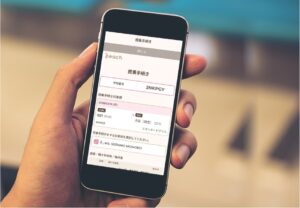
- Download the official Peach app.
- Add your booking to your account.
- Tap "Check In" to complete the check-in process.
- Display your mobile boarding pass (QR code).
Once you've checked in, simply present the QR code on your smartphone when passing through security and boarding your flight.
Benefits of Online Check-In
- Skip the airport check-in counter and save time.
- Your boarding pass is stored conveniently on your smartphone.
- If you don't have checked baggage, you can proceed directly to the security checkpoint.
When Online Check-In Isn't Available
Online check-in cannot be used in the following situations:
- International flight bookings
- Group reservations of 10 or more passengers
- Certain bookings made through travel agencies
- Reservations requiring special assistance (such as wheelchair services)
- Bookings with incomplete payment
If your reservation falls into one of these categories, you'll need to check in at an airport self-service kiosk or the check-in counter.
Common Online Check-In Issues and How to Fix Them
- Your booking doesn't appear in the app: Select "Add Booking" and enter your booking reference to link your reservation.
- You can't check in: Confirm that you're within the check-in window and that your booking is eligible for online check-in.
- Your boarding pass doesn't display: Try again with a stable internet connection, and consider saving a screenshot of your QR code before heading to the airport.
What to Do After Checking In
- No checked baggage: Proceed directly to the security checkpoint.
- Checked baggage: Visit the baggage drop counter between 90 and 30 minutes before departure.
Keep in mind that the security checkpoint typically closes 25 minutes before departure, so be sure to arrive with plenty of time.
Should You Use Online Check-In?
If you're eligible, the answer is yes.
Online check-in helps you avoid unnecessary waiting at the airport and makes the boarding process much smoother. For most Peach domestic flights, it's the fastest and most convenient way to begin your journey.
Recommended Hotels for Early Morning Flights
Scoot operates several early morning departures from major airports in Japan.
Staying at an airport hotel the night before can reduce travel stress and help ensure you arrive at the airport on time.
This is especially recommended if you're traveling from outside the airport area or have a long journey to the airport.
Below are two highly rated hotels offering convenient airport access.

Ideal for Early Morning Flights from Narita Airport
Toyoko Inn Narita Airport Main Building
The hotel offers a free airport shuttle starting at 4:20 a.m., making it an excellent choice for AirAsia and other early morning LCC departures. Taking the first shuttle allows you to arrive at Narita Airport at approximately 4:50 a.m.

Ideal for Early Morning Flights from Kansai Airport
Kansai Airport Washington Hotel
A complimentary shuttle bus operates between the hotel and Kansai International Airport, making this hotel a convenient option for travelers catching early morning flights without worrying about transportation to the airport.
What Is Peach Auto Check-in? How It Works, Setup & Timeline
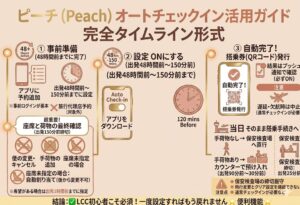
Peach Aviation Auto Check-in is a convenient feature that automatically checks you in 120 minutes before your scheduled departure once it has been enabled in advance.
It helps prevent missed check-ins and reduces the amount of time you spend at the airport, making it especially useful for first-time Peach passengers and travelers flying with low-cost carriers (LCCs).
Before You Begin | Add Your Booking to the App
To use Auto Check-in, you must first link your reservation to the official Peach app.
- Add your flight using the "Add Booking" feature in the app.
- Bookings made through travel agencies are generally not eligible.
- If you booked without signing in to your Peach account, push notifications may not be available even if you link your reservation later.
Some tickets issued by travel agencies may not support Auto Check-in. For the best experience, book your flight while signed in to your Peach account.
How to Enable Auto Check-in | Available from 48 Hours to 150 Minutes Before Departure
- 150 minutes before departure: Deadline for flight changes, cancellations, and adding checked baggage.
- If you haven't selected a seat: One will be assigned automatically and cannot be changed afterward. If you have a preferred seat, reserve it before this deadline.
Auto Check-in Is Completed 120 Minutes Before Departure
Once Auto Check-in has been enabled, your check-in will be completed automatically 120 minutes before departure, and your boarding pass (QR code) will be issued.
- You'll receive a push notification once check-in is complete.
- Make sure notifications are enabled on your smartphone.
Important: Auto Check-in may not be completed if your flight is delayed, canceled, or affected by operational changes. In these cases, you'll need to complete the standard check-in process.
What to Do on the Day of Departure
Once you've been checked in automatically, simply proceed according to your travel plans.
Remember that the security checkpoint closes 25 minutes before departure.
Auto Check-in Timeline
- 48 hours–150 minutes before departure: Auto Check-in can be enabled.
- 150 minutes before departure: Deadline for flight changes, cancellations, and adding checked baggage.
- 120 minutes before departure: Auto Check-in is completed automatically.
- 90–30 minutes before departure: Drop off checked baggage if necessary.
- 25 minutes before departure: Security checkpoint closes.
Important Things to Keep in Mind
- Auto Check-in may not be available or complete successfully in every situation.
- For round-trip or multi-city itineraries, you must enable Auto Check-in separately for each flight.
- If you change your booking, your Auto Check-in settings will be canceled.
- Even if you've been checked in automatically, arriving after the airport deadlines will result in denied boarding.
Bottom Line | The Easiest Way to Avoid Missing Check-in
Auto Check-in is an excellent feature that completes your check-in automatically before departure. Even so, you should still confirm that you've received your boarding pass, verify your flight information, and arrive at the airport well before the required deadlines to ensure a smooth journey.
How to Use Peach's Self-Service Check-in Kiosks | Check-in Hours, Airport Locations & Important Tips

Peach Aviation's self-service check-in kiosks offer a fast and convenient way to check in at the airport.
The process is simple—just enter your booking reference or scan your QR code to print your boarding pass.
Here's everything you need to know about using Peach's self-service kiosks, including where they're available, check-in hours, and important things to keep in mind.
Where Can You Use a Self-Service Check-in Kiosk?
Self-service check-in kiosks are available under the following conditions:
- Domestic flights: Available at all Peach domestic airports.
- International flights: Available only at Narita, Kansai, and Naha airports.
If your departure airport doesn't have a self-service kiosk, you'll need to check in at the airport counter.
Check-in Hours | Domestic vs. International Flights
The available check-in window depends on whether you're flying on a domestic or international flight. Once the check-in deadline has passed, you won't be able to check in.
- Domestic flights: Available from 90 minutes to 30 minutes before departure.
- International flights: Available from 120 minutes to 50 minutes before departure.
How to Use a Peach Self-Service Check-in Kiosk
- Go to a Peach self-service check-in kiosk at the airport.
- Enter your booking reference or scan your QR code.
- Review your booking details.
- Print your boarding pass.
Simply follow the on-screen instructions, making the process quick and easy—even for first-time travelers.
What You'll Need Before You Start
Before heading to the airport, make sure you have one of the following:
- Your booking reference (6-character alphanumeric code)
- Your QR code (displayed on your smartphone or printed)
Having these ready in advance will help you complete check-in more quickly.
Why Use a Self-Service Check-in Kiosk?
- Easy-to-use interface that's suitable even for first-time travelers.
- Typically shorter wait times than the staffed check-in counter.
- Airport staff are available if you need assistance.
Important Tips | Don't Miss the Check-in Deadline
- Self-service kiosks can become busy during peak travel periods such as Golden Week and the Obon holidays.
- If you're checking baggage, it must also be dropped off before the baggage acceptance deadline.
Who Should Use a Self-Service Check-in Kiosk?
- Travelers who aren't comfortable using the mobile app.
- Anyone who prefers checking in after arriving at the airport.
- Passengers traveling on eligible international flights.
Bottom Line | A Fast and Reliable Check-in Option
Peach's self-service check-in kiosks offer one of the quickest and most convenient ways to check in for your flight.
However, Peach strictly enforces its check-in deadlines, so be sure to arrive at the airport with plenty of time to spare to avoid missing your flight.
How to Check In at a Peach Airport Counter | Check-in Hours, Eligibility, and Important Tips
If you need to check in at a Peach airport counter, it's a good idea to review your booking details before arriving at the airport.
Even a small mistake in your reservation can sometimes result in unexpected delays or additional fees.
Editor's Story: A Simple Name Typo Cost Me ¥2,000 (About US$13)

I once ran into a problem because of a spelling mistake in my name when making a reservation.
When I checked in at the airport counter, the staff informed me that my name didn't exactly match my booking. I had to pay a ¥2,000 (about US$13) name correction fee on the spot.
With low-cost carriers (LCCs), even a single incorrect letter may be considered a different passenger, so it's essential to enter your name carefully when booking.
👉 Always double-check the spelling of your name before you travel. Even a small typo could delay your check-in or result in an additional fee.
Always Double-Check Your LCC Booking!
As soon as your booking is confirmed, make sure your full name exactly matches your passport or government-issued ID, including every letter and spelling.
How to Check In at a Peach Airport Counter | Check-in Hours, Eligibility & Important Tips
Peach Aviation's airport check-in counter provides staff assistance throughout the check-in process, making it the best option if you cannot use the mobile app or self-service kiosk, or simply prefer in-person support.
Here's everything you need to know about who should use the counter, check-in hours, and how the process works.
Who Should Use the Airport Check-in Counter?
Airport counter check-in is recommended in the following situations:
- You're traveling on an international flight (at airports where online or kiosk check-in isn't available).
- You cannot use the Peach app or a self-service kiosk.
- You require special assistance, such as wheelchair support.
- You're checking oversized, fragile, or restricted baggage.
If you're unsure which check-in method to use, the airport counter is generally the safest option.
Check-in Hours
- Domestic flights: 90 to 30 minutes before departure
- International flights: 120 to 50 minutes before departure
Once the check-in deadline has passed, boarding will no longer be possible.
How to Check In at the Airport Counter
- Go to the Peach check-in counter.
- Present your booking reference or reservation details.
- Complete identity and travel document verification (passport required for international flights).
- Receive your boarding pass.
- Check in any baggage, if applicable.
After completing check-in, proceed to the security checkpoint.
Benefits of Airport Counter Check-in
- Receive assistance directly from airport staff.
- Get immediate help if there is a problem with your reservation or travel documents.
- Ideal for international travel, special assistance requests, or more complex itineraries.
Important Tips
- Airport counters can become very busy during Golden Week, Obon, New Year holidays, weekends, and early-morning departures.
- International travelers should allow extra time for passport and document verification.
- Even if you arrive before the official deadline, long queues could cause you to miss check-in.
For the smoothest experience, it's recommended to arrive at the airport 90 minutes before domestic flights and 120 minutes before international flights.
Common Mistakes to Avoid
Arriving Too Late
Many travelers mistakenly assume they only need to arrive before the check-in deadline. In reality, long lines at the counter or baggage drop can take much longer than expected.
During busy travel periods, arriving early is the best way to avoid missing your flight.
Missing or Incorrect Travel Documents
International passengers should make sure they have a valid passport, any required visas, and that the name on their reservation exactly matches their travel document.
Even a small spelling mistake could delay check-in or require a name correction fee.
Bottom Line
Airport counter check-in is the most reliable option for travelers who want staff assistance or have special travel requirements.
To avoid unnecessary stress, arrive early, prepare your travel documents in advance, and complete check-in well before the deadline.
Peach Check-in Deadlines | Domestic & International Cutoff Times Explained
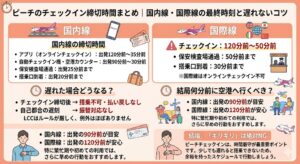
Peach Aviation has strict check-in, security, and boarding deadlines. Missing any of these cutoff times can result in denied boarding, even if you've already arrived at the airport.
Here's a quick overview of the deadlines you need to know.
Domestic Flight Deadlines
- Official App (Online Check-in): 120–35 minutes before departure
- Self-Service Kiosk / Airport Counter: 90–30 minutes before departure
- Security Checkpoint: No later than 25 minutes before departure
- Boarding Gate: Arrive at least 20 minutes before departure
International Flight Deadlines
Online check-in is not available for Peach international flights, so all passengers must check in at the airport.
- Airport Check-in: 120–50 minutes before departure
- Security Checkpoint: By 50 minutes before departure
- Boarding Gate: At least 30 minutes before departure
International travelers should also allow extra time for passport and immigration procedures.
What Happens If You Miss the Deadline?
- Miss the check-in deadline: Boarding will be denied, and tickets are generally non-refundable.
- Arrive late for personal reasons: Peach typically does not offer free rebooking or transfers.
Like most low-cost carriers, Peach strictly enforces these policies.
Recommended Arrival Times
- Domestic flights: Arrive at least 90 minutes before departure.
- International flights: Arrive at least 120 minutes before departure.
During holidays, weekends, or busy travel periods, arriving even earlier is recommended to allow time for long lines.
Bottom Line
When flying with Peach, always plan your journey around the airline's official deadlines—not your departure time.
Allow extra time for check-in, baggage drop, security screening, and getting to your boarding gate. Arriving early is the easiest way to ensure a smooth and stress-free start to your trip.
Airport Check-in Process for Peach Aviation | Step-by-Step Guide from Check-in to Boarding

When flying with Peach Aviation, understanding the airport check-in process in advance can help ensure a smooth journey.
Because Peach is a low-cost carrier (LCC), its check-in and boarding deadlines are strictly enforced. Missing a step or arriving late could result in being denied boarding.
Here's a simple guide to the entire process, from check-in to boarding your flight.
💡 Editor's Tip: Allow Extra Time for Kansai Airport Terminal 2

Peach Aviation primarily operates from Terminal 2 at Kansai International Airport (KIX), which is dedicated to low-cost carriers.
However, Terminal 2 is located separately from Terminal 1, where the train station is. Many travelers underestimate the transfer time and end up rushing to their flight.
To reach Terminal 2, you'll need to take the free shuttle bus. The ride itself takes about 10 minutes, but including waiting time, the total transfer can easily take around 20 minutes.
Walking between the terminals is not possible, so missing the shuttle bus can seriously delay your trip.
The most common mistakes include:
- Arriving at Terminal 1 first and then having to find the shuttle bus stop
- Not factoring the shuttle bus waiting time into the schedule
- Planning to arrive at KIX Station only minutes before departure
If you miss the check-in deadline by even one minute, you may be denied boarding without exception. If you're flying Peach from Kansai Airport, we strongly recommend arriving at least 30 minutes earlier than your usual schedule.
- ✈️ Domestic flights: Arrive about 110 minutes before departure (instead of the usual 90 minutes)
- ✈️ International flights: Arrive about 140 minutes before departure (instead of the usual 120 minutes)
If it's your first time flying Peach—or you're traveling during holidays or other busy periods—remember that reaching the airport station is only part of the journey. You'll still need extra time to transfer to Terminal 2 before check-in.
Peach Airport Departure Process | Step-by-Step Guide from Check-in to Boarding
1. Complete Check-in (Online or at the Airport)
The first step is completing your check-in. You cannot board your Peach flight unless check-in has been completed before the deadline.
You can check in using one of the following methods:
- Official Peach App (Online Check-in): Available for domestic flights only
- Self-Service Check-in Kiosk: Available at eligible airports
- Airport Check-in Counter: Staff assistance available
Completing online check-in in advance can save time and help you avoid airport queues.
2. Drop Off Checked Baggage (If Required)
If you have checked baggage, proceed to the baggage drop counter after completing check-in.
Important: Baggage drop-off is not accepted after the deadline.
Make sure to allow enough time, especially during busy travel periods when queues may be longer.
3. Go Through Security Screening
All passengers must pass through security screening before boarding, whether or not they have checked baggage.
- Security deadline: 25 minutes before departure
Security checkpoints can become crowded during weekends, holidays, and peak travel seasons, so avoid arriving at the last minute.
4. Proceed to the Boarding Gate
After passing security, follow the airport signs and proceed to your boarding gate.
- Gate arrival deadline: 20 minutes before departure
Be sure to arrive at the gate on time, as Peach may close boarding according to its schedule.
5. Board the Aircraft
When boarding begins, passengers will enter the aircraft in order.
Have your QR code or boarding pass ready and present it to staff when requested.
Tips for a Smooth Peach Airport Experience
- Choose your preferred check-in method before arriving at the airport.
- Prepare your baggage and travel documents in advance.
- Always check the latest check-in, security, and boarding deadlines.
- Allow extra time during holidays and busy travel periods.
Peach's airport procedures are simple, but strict time management is essential when flying with a low-cost carrier.
By understanding each step in advance and arriving with enough time, you can enjoy a smoother and more stress-free travel experience.
Common Peach Check-in Problems and Solutions | Why Check-in Fails and What to Do If You Are Late

Flying with a low-cost carrier (LCC) requires careful time management. With Peach Aviation, missing a check-in deadline can result in denied boarding and no refund in most cases.
To avoid problems at the airport, it is important to understand the most common Peach check-in issues and how to solve them before your departure.
Unable to Complete Online Check-in
- Possible causes: You are outside the check-in window, traveling on an international flight, using a booking that is not eligible, your payment is incomplete, or other restrictions apply.
- Solution: Confirm whether your booking is eligible for online check-in. If it is unavailable, use a Peach self-service check-in kiosk or airport counter.
Your Reservation Does Not Appear in the Peach App
- Possible causes: Your booking has not been linked to your Peach account, or you made the reservation without signing in.
- Solution: Use the "Add Booking" function in the Peach app to link your reservation. For future trips, booking while logged in is recommended.
Your Boarding Pass QR Code Cannot Be Displayed
- Possible causes: Poor internet connection, an outdated app version, or temporary system issues.
- Solution: Try opening the boarding pass again with a stable internet connection. Saving a screenshot of your QR code before arriving at the airport is also recommended.
Confirmation Email or Booking Information Has Not Arrived
- Possible causes: The email may have been filtered into your spam folder, or the registered email address may contain an error.
- Solution: Check your spam folder first. If you still cannot find the information, confirm your booking details through Peach's official website or contact customer support.
You Cannot Arrive Before the Peach Check-in Deadline
- General rule: If you miss the check-in deadline due to personal reasons, you will generally not be allowed to board and refunds are usually unavailable.
- Solution: Always arrive at the airport early. If your delay is caused by public transportation issues, keep any official delay certificate because it may be required for assistance.
You May Miss a Connecting Flight
- Possible causes: Peach does not offer through check-in for connecting flights, meaning passengers must complete separate check-in procedures. Checked baggage may also need to be collected and rechecked.
- Solution: Allow sufficient connection time. A minimum of 90 minutes or more is recommended when planning a connection with Peach.
Your Baggage Cannot Be Checked In
- Possible causes: Arriving after the baggage drop deadline or exceeding baggage allowance limits.
- Solution: Check baggage rules in advance and arrive early enough to complete baggage procedures before the deadline.
Summary | Preparation Is the Best Way to Avoid Peach Check-in Problems
Most Peach check-in problems can be avoided with early arrival, correct booking information, and advance preparation.
Before traveling, confirm your check-in method, prepare your boarding pass, and allow extra time at the airport. Understanding Peach's strict deadlines will help you enjoy a smoother and stress-free journey.
Best Hotels for Peach Aviation Flash Sale Travelers in Sapporo & Okinawa
Peach Aviation's flash sales often include popular domestic routes such as Sapporo and Okinawa, making them a great opportunity to travel across Japan at lower prices.
Once you've secured your flight, it's a good idea to book your hotel as early as possible.
Hotels in popular destinations often become more expensive as flight sales begin, so early booking usually offers the best value.
Below are two highly rated hotels that are especially popular with Jetstar travelers.

Excellent Value in Central Sapporo
Dormy Inn PREMIUM Sapporo
Conveniently located within walking distance of Susukino and Odori Park, this popular hotel offers a natural hot spring, complimentary late-night ramen, and excellent amenities. Its convenient location and outstanding value make it one of the best-value hotels in central Sapporo.

Outstanding Value Near Kokusai Street
Okinawa Hinode Hotel
Just a one-minute walk from Makishi Station on the Yui Rail, this hotel is also within walking distance of Kokusai Street. Guests can enjoy complimentary drinks, ice cream, and late-night ramen, making it an excellent value for budget-conscious travelers visiting Okinawa.

Top Picks in Tokyo, Osaka, Kyoto, Hokkaido & Okinawa
25 Best Hotels in Japan
We’ve selected 25 recommended hotels across Tokyo, Osaka, Kyoto, Hokkaido, and Okinawa. Each hotel was chosen based on accessibility, sightseeing convenience, and how well it suits different travel styles.
💳 My Overseas ATM Experience: When My Card Was Declined Abroad

After arriving at Don Mueang International Airport in Thailand, I had an unexpected problem: my credit cards were repeatedly declined at ATMs, and I was unable to withdraw cash.
This situation can be especially stressful when traveling with LCCs (low-cost carriers), as many budget airlines operate late-night flights. Arriving at your destination without access to cash can quickly become a major issue.
Eventually, Revolut was the only card that worked immediately. My experience showed that overseas ATM availability can vary significantly depending on the card provider and payment network.
▶ Read my real experience of a card being declined at an overseas ATM
Stay Connected in Japan with a Reliable eSIM
Once you've learned how to check in and board your flight, don't forget to prepare your internet connection before traveling to Japan.
A travel eSIM lets you get online as soon as you arrive—no SIM card swaps or pocket Wi-Fi rental required. With mobile data ready on your smartphone, you can easily use Google Maps, book train tickets, contact your hotel, and stay in touch with family and friends throughout your trip.
Set up your eSIM before departure so you can start exploring Japan the moment you land.
🥇 Holafly
Most Popular ★★★★★
[Unlimited Data] Get 5% OFF Your Holafly Unlimited Japan eSIM
🥈 Ubigi
Best Value
[Prepaid Plans] Book Your Ubigi eSIM Plan at a Discounted Rate
🥉 Airalo
Short-Term Trips
📱 Mobal Voice + Data eSIM
Japanese Phone Number
[Japanese Phone Number] Get a Mobal Voice + Data eSIM
\ Never Miss Flight Sales and the Latest Cheap Fare Deals! /
The latest flight sale updates from JAL, ANA, and LCC airlines are also shared daily in real time on our social media channels.
※Receive the latest travel updates, including limited-time flight deals and upcoming sale predictions.
Peach Check-in Guide Summary | Know the Deadlines and Avoid Missing Your Flight
The most important thing to remember when flying with Peach Aviation is simple: never miss the deadlines.
As a low-cost carrier (LCC), Peach strictly enforces its check-in and boarding rules. Arriving late—even by a few minutes—may result in denied boarding, and refunds or flight changes are generally not available.
You Can Choose From Three Peach Check-in Methods
- Official Peach App (Online Check-in) ※Domestic flights only
- Self-service check-in kiosk
- Airport check-in counter
For domestic flights, online check-in through the Peach app is the fastest and most convenient option because it allows you to complete the process before arriving at the airport.
Always Remember These Important Peach Deadlines
Conclusion | Arrive Early and Enjoy a Stress-Free Peach Flight
- Complete check-in in advance whenever possible (the Peach app is recommended for eligible domestic flights)
- Allow extra time for airport procedures, especially during holidays and busy travel periods
- Always check your boarding deadline before heading to the airport
By understanding Peach's strict deadlines and preparing in advance, you can avoid unnecessary stress and enjoy a smoother travel experience.
Compare the Latest Fares Before Prices Increase